动态加载技术(插件化)系列已经坑了有一段时间了,不过 UP 主我并没有放弃治疗哈,相信在不就的未来就可以看到 “系统 Api Hook 模式” 和插件化框架 Frontia 的更新了。今天要讲的是动态加载技术的亲戚 —— MultiDex。他们的核心原理之一都是 dex 文件的加载。
MultiDex 是 Google 为了解决 “65535 方法数超标 ” 以及 “INSTALL_FAILED_DEXOPT ” 问题而开发的一个 Support 库,具体如何使用 MultiDex 现在市面已经有一大堆教程(可以参考 给 App 启用 MultiDex 功能 ),这里不再赘述。这篇日志主要是配合源码分析 MultiDex 的工作原理,以及提供一些 MultiDex 优化的方案。
Dex 的工作机制 等等,这个章节讲的不是 MultiDex 吗,怎么变成 Dex 了?没错哈,没有 Dex,哪来的 MultiDex。在 Android 中,对 Dex 文件操作对应的类叫做 DexFile。在 CLASSLOADER 的工作机制 中,我们说到:
对于 Java 程序来说,编写程序就是编写类,运行程序也就是运行类(编译得到的 class 文件),其中起到关键作用的就是类加载器 ClassLoader。
Android 程序的每一个 Class 都是由 ClassLoader#loadClass 方法加载进内存的,更准确来说, 一个 ClassLoader 实例会有一个或者多个 DexFile 实例 ,调用了 ClassLoader#loadClass 之后,ClassLoader 会通过类名,在自己的 DexFile 数组里面查找有没有那个 DexFile 对象里面存在这个类,如果都没有就抛 ClassNotFound 异常。ClassLoader 通过调用 DexFile 的一个叫 defineClass 的 Native 方法去加载指定的类,这点与 JVM 略有不同,后者是直接调用 ClassLoader#defineCLass 方法,反正最后实际加载类的方法都叫 defineClass 就没错了🌝。
创建 DexFile 对象 首先来看看造 DexFile 对象的构方法。
1
2
3
4
5
6
7
8
9
10
11
12
13
14
15
16
17
18
19
20
21
22
23
24
25
26
27
28
29
30
31
32
33
34
35
36
37
38
39
40
41
42
public final class DexFile private int mCookie; private final String mFileName; ... public DexFile (File file) throws IOException this (file.getPath()); } public DexFile (String fileName) throws IOException mCookie = openDexFile(fileName, null , 0 ); mFileName = fileName; guard.open("close" ); } private DexFile (String sourceName, String outputName, int flags) throws IOException mCookie = openDexFile(sourceName, outputName, flags); mFileName = sourceName; guard.open("close" ); } static public DexFile loadDex (String sourcePathName, String outputPathName, int flags) throws IOException return new DexFile(sourcePathName, outputPathName, flags); } public Class loadClass (String name, ClassLoader loader) String slashName = name.replace('.' , '/' ); return loadClassBinaryName(slashName, loader); } public Class loadClassBinaryName (String name, ClassLoader loader) return defineClass(name, loader, mCookie); } private native static Class defineClass (String name, ClassLoader loader, int cookie) native private static int openDexFile (String sourceName, String outputName, int flags) throws IOException native private static int openDexFile (byte [] fileContents) ... }
通过以前分析过的源码,我们知道 ClassLoader 主要是通过 DexFile.loadDex 这个静态方法来创建它需要的 DexFile 实例的,这里创建 DexFile 的时候,保存了 Dex 文件的文件路径 mFileName, 同时调用了 openDexFile 的 Native 方法打开 Dex 文件 并返回了一个 mCookie 的整型变量(我不知道这个干啥用的,我猜它是一个 C++ 用的资源句柄,用于 Native 层访问具体的 Dex 文件)。在 Native 层的 openDexFile 方法里,主要做了检查当前创建来的 Dex 文件是否是有效的 Dex 文件,还是是一个带有 Dex 文件的压缩包,还是一个无效的 Dex 文件。
加载 Dex 文件里的类 加载类的时候,ClassLoader 又是通过 DexFile#loadClass 这个方法来完成的,这个方法里调用了 defineClass 这个 Native 方法, 看来 DexFile 才是加载 Class 的具体 API,加载 Dex 文件和加载具体 Class 都是通过 Native 方法完成 ,ClassLoader 有点名不副实啊。
MultiDex 的工作机制 当一个 Dex 文件太肥的时候(方法数目太多、文件太大),在打包 Apk 文件的时候就会出问题,就算打包的时候不出问题,在 Android 5.0 以下设备上安装或运行 Apk 也会出问题(具体原因可以参考 给 App 启用 MultiDex 功能 )。既然一个 Dex 文件不行的话,那就把这个硕大的 Dex 文件拆分成若干个小的 Dex 文件,刚好一个 ClassLoader 可以有多个 DexFile,这就是 MultiDex 的基本设计思路。
工作流程 MultiDex 的工作流程具体分为两个部分,一个部分是打包构建 Apk 的时候,将 Dex 文件拆分成若干个小的 Dex 文件,这个 Android Studio 已经帮我们做了(设置 “multiDexEnabled true”),另一部分就是在启动 Apk 的时候,同时加载多个 Dex 文件(具体是加载 Dex 文件优化后的 Odex 文件,不过文件名还是.dex),这一部分工作从 Android 5.0 开始系统已经帮我们做了,但是在 Android 5.0 以前还是需要通过 MultiDex Support 库来支持(MultiDex.install (Context))。
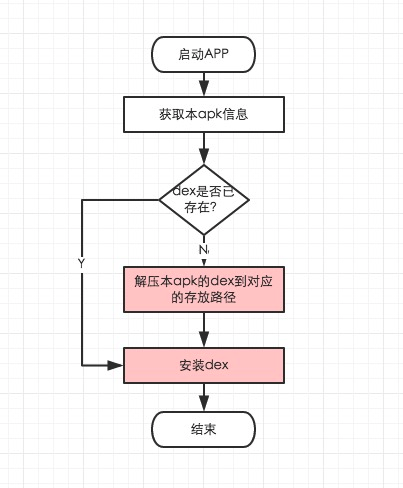
所以我们需要关心的是第二部分,这个过程的简单示意流程图如下。
(图中红色部分为耗时比较大的地方)
源码分析 现在官方已经部署的 MultiDex Support 版本是 com.android.support:multidex:1.0.1,但是现在仓库的 master 分支已经有了许多新的提交(其中最明显的区别是加入了 FileLock 来控制多进程同步问题),所以这里分析的源码都是最新的 master 分支上的。
MultiDex Support 的入口是 MultiDex.install (Context),先从这里入手吧。(这次我把具体的分析都写在代码的注释了,这样看是不是更简洁明了些?)
1
2
3
4
5
6
7
8
9
10
11
12
13
14
15
16
17
18
19
20
21
22
23
24
25
26
27
28
29
30
31
32
33
34
35
36
37
38
39
40
41
42
43
44
45
46
47
48
49
50
51
52
53
54
55
56
57
58
59
60
61
62
63
64
65
66
67
68
69
70
71
72
73
74
75
76
77
78
79
80
81
82
83
public static void install (Context context) Log.i(TAG, "install" ); Log.i(TAG, "VM has multidex support, MultiDex support library is disabled." ); return ; } if (Build.VERSION.SDK_INT < MIN_SDK_VERSION) { throw new RuntimeException("Multi dex installation failed. SDK " + Build.VERSION.SDK_INT + " is unsupported. Min SDK version is " + MIN_SDK_VERSION + "." ); } try { ApplicationInfo applicationInfo = getApplicationInfo(context); if (applicationInfo == null ) { } String apkPath = applicationInfo.sourceDir; if (installedApk.contains(apkPath)) { return ; } installedApk.add(apkPath); Log.w(TAG, "MultiDex is not guaranteed to work in SDK version " + Build.VERSION.SDK_INT + ": SDK version higher than " + MAX_SUPPORTED_SDK_VERSION + " should be backed by " + "runtime with built-in multidex capabilty but it's not the " + "case here: java.vm.version=\"" + System.getProperty("java.vm.version" ) + "\"" ); } ClassLoader loader; try { loader = context.getClassLoader(); } catch (RuntimeException e) { Log.w(TAG, "Failure while trying to obtain Context class loader. " + "Must be running in test mode. Skip patching." , e); return ; } if (loader == null ) { Log.e(TAG, "Context class loader is null. Must be running in test mode. " + "Skip patching." ); return ; } try { clearOldDexDir(context); } catch (Throwable t) { Log.w(TAG, "Something went wrong when trying to clear old MultiDex extraction, " + "continuing without cleaning." , t); } File dexDir = getDexDir(context, applicationInfo); List<File> files = MultiDexExtractor.load(context, applicationInfo, dexDir, false ); installSecondaryDexes(loader, dexDir, files); } else { Log.w(TAG, "Files were not valid zip files. Forcing a reload." ); files = MultiDexExtractor.load(context, applicationInfo, dexDir, true ); if (checkValidZipFiles(files)) { installSecondaryDexes(loader, dexDir, files); } else { throw new RuntimeException("Zip files were not valid." ); } } } } catch (Exception e) { Log.e(TAG, "Multidex installation failure" , e); throw new RuntimeException("Multi dex installation failed (" + e.getMessage() + ")." ); } Log.i(TAG, "install done" ); }
具体代码的分析已经在上面代码的注释里给出了,从这里我们也可以看出,整个 MultiDex.install (Context) 的过程中,关键的步骤就是 MultiDexExtractor#load 方法和 MultiDex#installSecondaryDexes 方法。
(这部分是题外话)其中有个 MultiDex#clearOldDexDir (Context)** 方法,这个方法的作用是删除 **/data/data//files/code-cache ,一开始我以为这个方法是删除上一次执行 MultiDex 后的缓存文件,不过这明显不对,不可能每次 MultiDex 都重新解压 dex 文件一边,这样每次启动会很耗时, 只有第一次冷启动的时候才需要解压 dex 文件 。后来我又想是不是以前旧版的 MultiDex 曾经把缓存文件放在这个目录里,现在新版本只是清除以前旧版的遗留文件?但是我找遍了整个 MultiDex Repo 的提交也没有见过类似的旧版本代码。后面我仔细看 MultiDex#getDexDir 这个方法才发现,原来 MultiDex 在获取 dex 缓存目录是,会优先获取 /data/data//code-cache 作为缓存目录,如果获取失败,则使用 /data/data//files/code-cache 目录,而后者的缓存文件会在每次 App 重新启动的时候被清除。感觉 MultiDex 获取缓存目录的逻辑不是很严谨,而获取缓存目录失败也是 MultiDex 工作工程中少数有重试机制的地方,看来 MultiDex 真的是一个临时的兼容方案,Google 也许并不打算认真处理这些历史的黑锅。
接下来再看看 MultiDexExtractor#load 这个方法。
1
2
3
4
5
6
7
8
9
10
11
12
13
14
15
16
17
18
19
20
21
22
23
24
25
26
27
28
29
30
31
32
33
34
35
36
37
38
39
40
41
42
43
44
45
46
47
48
49
50
51
52
53
54
55
56
57
58
59
60
61
62
static List<File> load (Context context, ApplicationInfo applicationInfo, File dexDir, boolean forceReload) throws IOException Log.i(TAG, "MultiDexExtractor.load(" + applicationInfo.sourceDir + ", " + forceReload + ")" ); final File sourceApk = new File(applicationInfo.sourceDir); File lockFile = new File(dexDir, LOCK_FILENAME); RandomAccessFile lockRaf = new RandomAccessFile(lockFile, "rw" ); FileChannel lockChannel = null ; FileLock cacheLock = null ; List<File> files; IOException releaseLockException = null ; try { lockChannel = lockRaf.getChannel(); Log.i(TAG, "Blocking on lock " + lockFile.getPath()); cacheLock = lockChannel.lock(); Log.i(TAG, lockFile.getPath() + " locked" ); try { files = loadExistingExtractions(context, sourceApk, dexDir); } catch (IOException ioe) { Log.w(TAG, "Failed to reload existing extracted secondary dex files," + " falling back to fresh extraction" , ioe); files = performExtractions(sourceApk, dexDir); putStoredApkInfo(context, getTimeStamp(sourceApk), currentCrc, files.size() + 1 ); } } else { Log.i(TAG, "Detected that extraction must be performed." ); files = performExtractions(sourceApk, dexDir); putStoredApkInfo(context, getTimeStamp(sourceApk), currentCrc, files.size() + 1 ); } } finally { if (cacheLock != null ) { try { cacheLock.release(); } catch (IOException e) { Log.e(TAG, "Failed to release lock on " + lockFile.getPath()); releaseLockException = e; } } if (lockChannel != null ) { closeQuietly(lockChannel); } closeQuietly(lockRaf); } if (releaseLockException != null ) { throw releaseLockException; } Log.i(TAG, "load found " + files.size() + " secondary dex files" ); return files; }
这个过程主要是获取可以安装的 dex 文件列表,可以是上次解压出来的缓存文件,也可以是重新从 Apk 包里面提取出来的。需要注意的时,如果是重新解压,这里会有明显的耗时,而且解压出来的 dex 文件,会被压缩成.zip 压缩包,压缩的过程也会有明显的耗时(这里压缩 dex 文件可能是问了节省空间)。
如果 dex 文件是重新解压出来的,则会保存 dex 文件的信息,包括解压的 apk 文件的 crc 值、修改时间以及 dex 文件的数目,以便下一次启动直接使用已经解压过的 dex 缓存文件,而不是每一次都重新解压。
需要特别提到的是,里面的 FileLock 是最新的 master 分支里面新加进去的功能,现在最新的 1.0.1 版本里面是没有的。
无论是通过使用缓存的 dex 文件,还是重新从 apk 中解压 dex 文件,获取 dex 文件列表后,下一步就是安装(或者说加载)这些 dex 文件了。最后的工作在 MultiDex#installSecondaryDexes 这个方法里面。
1
2
3
4
5
6
7
8
9
10
11
12
13
private static void installSecondaryDexes (ClassLoader loader, File dexDir, List<File> files) throws IllegalArgumentException, IllegalAccessException, NoSuchFieldException, InvocationTargetException, NoSuchMethodException, IOException { if (!files.isEmpty()) { if (Build.VERSION.SDK_INT >= 19 ) { V19.install(loader, files, dexDir); } else if (Build.VERSION.SDK_INT >= 14 ) { V14.install(loader, files, dexDir); } else { V4.install(loader, files); } } }
因为在不同的 SDK 版本上,ClassLoader(更准确来说是 DexClassLoader)加载 dex 文件的方式有所不同,所以这里做了 V4/V14/V19 的兼容(Magic Code)。
Build.VERSION.SDK_INT < 14
1 2 3 4 5 6 7 8 9 10 11 12 13 14 15 16 17 18 19 20 21 22 23 24 25 26 27 28 29 30 31 32 33 34 private static final class V4 private static void install (ClassLoader loader, List<File> additionalClassPathEntries) throws IllegalArgumentException, IllegalAccessException, NoSuchFieldException, IOException { int extraSize = additionalClassPathEntries.size(); Field pathField = findField(loader, "path" ); StringBuilder path = new StringBuilder((String) pathField.get(loader)); String[] extraPaths = new String[extraSize]; File[] extraFiles = new File[extraSize]; ZipFile[] extraZips = new ZipFile[extraSize]; DexFile[] extraDexs = new DexFile[extraSize]; for (ListIterator<File> iterator = additionalClassPathEntries.listIterator(); iterator.hasNext();) { File additionalEntry = iterator.next(); String entryPath = additionalEntry.getAbsolutePath(); path.append(':' ).append(entryPath); int index = iterator.previousIndex(); extraPaths[index] = entryPath; extraFiles[index] = additionalEntry; extraZips[index] = new ZipFile(additionalEntry); extraDexs[index] = DexFile.loadDex(entryPath, entryPath + ".dex" , 0 ); } pathField.set(loader, path.toString()); expandFieldArray(loader, "mPaths" , extraPaths); expandFieldArray(loader, "mFiles" , extraFiles); expandFieldArray(loader, "mZips" , extraZips); expandFieldArray(loader, "mDexs" , extraDexs); } }
14 <= Build.VERSION.SDK_INT < 19
1 2 3 4 5 6 7 8 9 10 11 12 13 14 15 16 17 18 19 20 21 22 23 24 private static final class V14 private static void install (ClassLoader loader, List<File> additionalClassPathEntries, File optimizedDirectory) throws IllegalArgumentException, IllegalAccessException, NoSuchFieldException, InvocationTargetException, NoSuchMethodException { Field pathListField = findField(loader, "pathList" ); Object dexPathList = pathListField.get(loader); expandFieldArray(dexPathList, "dexElements" , makeDexElements(dexPathList, new ArrayList<File>(additionalClassPathEntries), optimizedDirectory)); } private static Object[] makeDexElements( Object dexPathList, ArrayList<File> files, File optimizedDirectory) throws IllegalAccessException, InvocationTargetException, NoSuchMethodException { Method makeDexElements = findMethod(dexPathList, "makeDexElements" , ArrayList.class , File .class ) ; return (Object[]) makeDexElements.invoke(dexPathList, files, optimizedDirectory); } }
从 API14 开始,DexClassLoader 会使用一个 DexpDexPathList 类来封装 DexFile 数组。
1
2
3
4
5
6
7
8
9
10
11
12
13
14
15
16
17
18
19
20
21
22
23
24
25
26
27
28
29
30
31
32
33
34
35
36
37
38
39
40
41
42
43
44
45
46
47
48
49
50
51
final class DexPathList private static final String DEX_SUFFIX = ".dex" ; private static final String JAR_SUFFIX = ".jar" ; private static final String ZIP_SUFFIX = ".zip" ; private static final String APK_SUFFIX = ".apk" ; private static Element[] makeDexElements(ArrayList<File> files, File optimizedDirectory) { ArrayList<Element> elements = new ArrayList<Element>(); for (File file : files) { ZipFile zip = null ; DexFile dex = null ; String name = file.getName(); if (name.endsWith(DEX_SUFFIX)) { dex = loadDexFile(file, optimizedDirectory); } catch (IOException ex) { System.logE("Unable to load dex file: " + file, ex); } } else if (name.endsWith(APK_SUFFIX) || name.endsWith(JAR_SUFFIX) || name.endsWith(ZIP_SUFFIX)) { try { zip = new ZipFile(file); } catch (IOException ex) { System.logE("Unable to open zip file: " + file, ex); } try { dex = loadDexFile(file, optimizedDirectory); } catch (IOException ignored) { } } else { System.logW("Unknown file type for: " + file); } if ((zip != null ) || (dex != null )) { elements.add(new Element(file, zip, dex)); } } return elements.toArray(new Element[elements.size()]); } private static DexFile loadDexFile (File file, File optimizedDirectory) throws IOException { if (optimizedDirectory == null ) { return new DexFile(file); } else { String optimizedPath = optimizedPathFor(file, optimizedDirectory); return DexFile.loadDex(file.getPath(), optimizedPath, 0 ); } } }
通过调用 DexPathList#makeDexElements 方法,可以加载我们上面解压得到的 dex 文件,从代码也可以看出,DexPathList#makeDexElements 其实也是通过调用 DexFile#loadDex 来加载 dex 文件并创建 DexFile 对象的。V14 中,通过反射调用 DexPathList#makeDexElements 方法加载我们需要的 dex 文件,在把加载得到的数组扩展到 ClassLoader 实例的 “pathList” 字段,从而完成 dex 文件的安装。
从 DexPathList 的代码中我们也可以看出,ClassLoader 是支持直接加载.dex/.zip/.jar/.apk 的 dex 文件包的(我记得以前在哪篇日志中好像提到过类似的问题…)。
19 <= Build.VERSION.SDK_INT
1 2 3 4 5 6 7 8 9 10 11 12 13 14 15 16 17 18 19 20 21 22 23 24 25 26 27 28 29 30 31 32 33 34 35 36 37 38 39 40 41 42 43 44 45 46 47 48 49 50 51 52 private static final class V19 private static void install (ClassLoader loader, List<File> additionalClassPathEntries, File optimizedDirectory) throws IllegalArgumentException, IllegalAccessException, NoSuchFieldException, InvocationTargetException, NoSuchMethodException { Field pathListField = findField(loader, "pathList" ); Object dexPathList = pathListField.get(loader); ArrayList<IOException> suppressedExceptions = new ArrayList<IOException>(); expandFieldArray(dexPathList, "dexElements" , makeDexElements(dexPathList, new ArrayList<File>(additionalClassPathEntries), optimizedDirectory, suppressedExceptions)); if (suppressedExceptions.size() > 0 ) { for (IOException e : suppressedExceptions) { Log.w(TAG, "Exception in makeDexElement" , e); } Field suppressedExceptionsField = findField(dexPathList, "dexElementsSuppressedExceptions" ); IOException[] dexElementsSuppressedExceptions = (IOException[]) suppressedExceptionsField.get(dexPathList); if (dexElementsSuppressedExceptions == null ) { dexElementsSuppressedExceptions = suppressedExceptions.toArray( new IOException[suppressedExceptions.size()]); } else { IOException[] combined = new IOException[suppressedExceptions.size() + dexElementsSuppressedExceptions.length]; suppressedExceptions.toArray(combined); System.arraycopy(dexElementsSuppressedExceptions, 0 , combined, suppressedExceptions.size(), dexElementsSuppressedExceptions.length); dexElementsSuppressedExceptions = combined; } suppressedExceptionsField.set(dexPathList, dexElementsSuppressedExceptions); } } private static Object[] makeDexElements( Object dexPathList, ArrayList<File> files, File optimizedDirectory, ArrayList<IOException> suppressedExceptions) throws IllegalAccessException, InvocationTargetException, NoSuchMethodException { Method makeDexElements = findMethod(dexPathList, "makeDexElements" , ArrayList.class , File .class , ArrayList .class ) ; return (Object[]) makeDexElements.invoke(dexPathList, files, optimizedDirectory, suppressedExceptions); } }
V19 与 V14 差别不大,只不过 DexPathList#makeDexElements 方法多了一个 ArrayList 参数,如果在执行 DexPathList#makeDexElements 方法的过程中出现异常,后面使用反射的方式把这些异常记录进 DexPathList 的 dexElementsSuppressedExceptions 字段里面。
无论是 V4/V14 还是 V19,在创建 DexFile 对象的时候,都需要通过 DexFile 的 Native 方法 openDexFile 来打开 dex 文件,其具体细节暂不讨论(涉及到 dex 的文件结构,很烦,有兴趣请阅读 dalvik_system_DexFile.cpp ),这个过程的主要目的是给当前的 dex 文件做 Optimize 优化处理并生成相同文件名的 odex 文件,App 实际加载类的时候,都是通过 odex 文件进行的。因为每个设备对 odex 格式的要求都不一样,所以这个优化的操作只能放在安装 Apk 的时候处理,主 dex 的优化我们已经在安装 apk 的时候搞定了,其余的 dex 就是在 MultiDex#installSecondaryDexes 里面优化的,而后者也是 MultiDex 过程中,另外一个耗时比较多的操作。(在 MultiDex 中,提取出来的 dex 文件被压缩成.zip 文件,又优化后的 odex 文件则被保存为.dex 文件。)
到这里,MultiDex 的工作流程就结束了。怎么样,是不是觉得和以前谈到动态加载技术(插件化)的时候说的很像?没错,谁叫它们的核心都是 dex 文件呢。Java 老师第一节课就说 “ 类就是编程 ”,搞定类你就能搞定整个世界啊!
优化方案 MultiDex 有个比较蛋疼的问题,就是会产生明显的卡顿现象,通过上面的分析,我们知道具体的卡顿产生在 解压 dex 文件 以及 优化 dex 两个步骤。不过好在,在 Application#attachBaseContext (Context) 中,UI 线程的阻塞是不会引发 ANR 的,只不过这段长时间的卡顿(白屏)还是会影响用户体验。
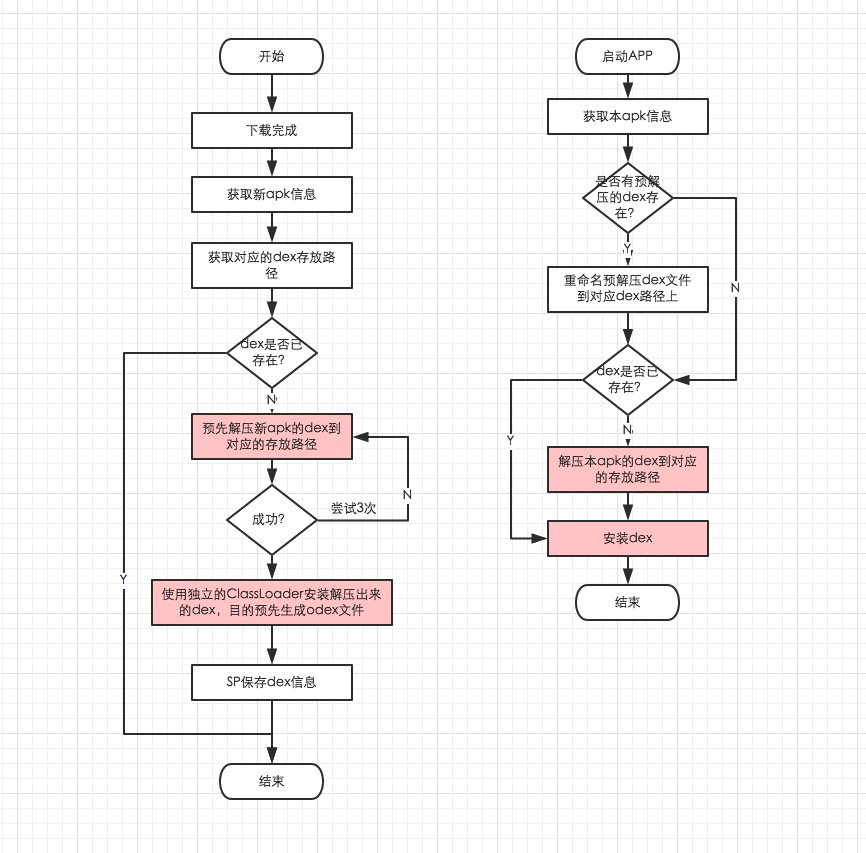
PreMultiDex 方案 大致思路是,在安装一个新的 apk 的时候,先在 Worker 线程里做好 MultiDex 的解压和 Optimize 工作,安装 apk 并启动后,直接使用之前 Optimize 产生的 odex 文件,这样就可以避免第一次启动时候的 Optimize 工作。
安装 dex 的时候,核心是创建 DexFile 对象并使用其 Native 方法对 dex 文件进行 opt 处理,同时生产一个与 dex 文件(.zip)同名的已经 opt 过的 dex 文件(.dex)。如果安装 dex 的时候,这个 opt 过的 dex 文件已经存在,则跳过这个过程,这会节省许多耗时。所以优化的思路就是,下载 Apk 完成的时候,预先解压 dex 文件,并预先触发安装 dex 文件以生产 opt 过的 dex 文件。这样覆盖安装 Apk 并启动的时候,如果 MultiDex 能命中解压好的 dex 和 odex 文件,则能避开耗时最大的两个操作。
不过这个方案的缺点也是明显的,第一次安装的 apk 没有作用,而且事先需要使用内置的 apk 更新功能把新版本的 apk 文件下载下来后,才能做 PreMultiDex 工作。
异步 MultiDex 方案 这种方案也是目前比较流行的 Dex 手动分包方案 ,启动 App 的时候,先显示一个简单的 Splash 闪屏界面,然后启动 Worker 线程执行 MultiDex#install (Context) 工作,就可以避免 UI 线程阻塞。不过要确保启动以及启动 MultiDex#install (Context) 所需要的类都在主 dex 里面(手动分包),而且需要处理好进程同步问题。
参考资料: